DJI ESC Error — Error Code: 30210 Explained
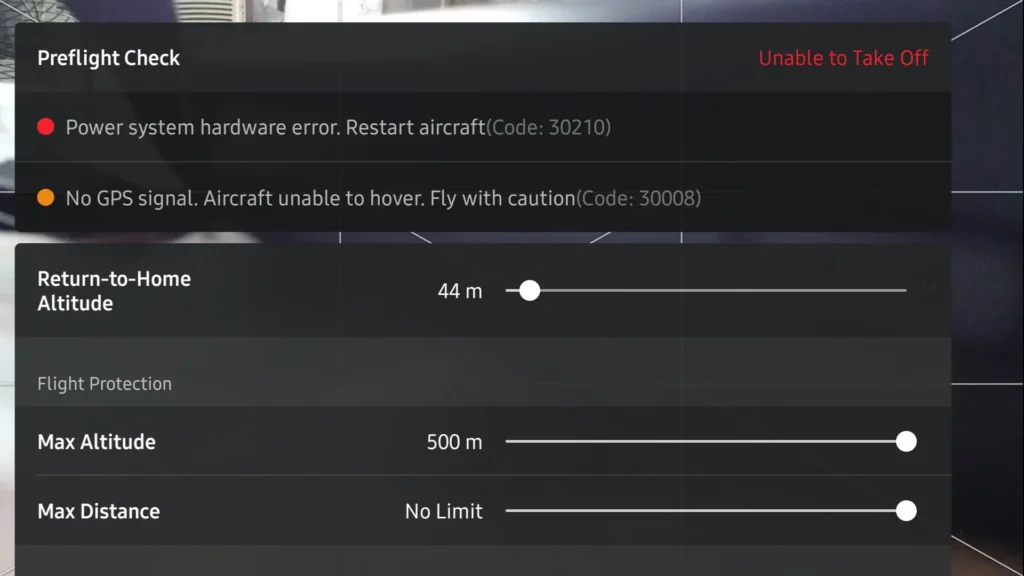
The ESC (Electronic Speed Controller) is the bridge between the drone’s brain and its motors. It receives commands from the flight controller and adjusts how fast the motors need to spin. When a malfunction occurs in the system, a warning with code 30210 appears on the controller.
DJI ESC error usually occurs due to these three reasons:
- Software Issues: Errors during updates or data incompatibility.
- Physical Obstructions: Sand, dust, or foreign objects entering the motors.
- Hardware Failures: Overcurrent, burned circuits, or cable disconnection.
One of the most frustrating warnings that interrupts DJI drone users’ flight enjoyment is undoubtedly the DJI ESC error (ESC Status Error) message. This warning that appears on screen usually prevents the drone from taking off and causes the motors not to spin. So, what causes this error and can it be fixed without sending it to a service center?
In this article, we’ll explain step by step the causes of ESC errors seen in DJI models including the Mavic, Mini, Air, and FPV series, along with troubleshooting methods you can apply at home.
What Is an ESC?
ESC stands for “Electronic Speed Controller.” In its simplest definition, an ESC is an electronic circuit that receives commands from the flight controller (the drone’s brain), converts the electrical energy from the battery into a language the motors can understand, and adjusts the rotation speed of the motors.
If the flight controller is the drone’s brain, the battery is its heart, and the motors are its muscles, then the ESC is the nervous system that manages how much power goes to those muscles.
How Does an ESC Work? Technical Deep Dive
The modern motors used in drones are typically Brushless motors. These motors cannot operate directly with the Direct Current (DC) from the battery. This is where the ESC steps in and performs a vital conversion process:
- DC to AC Conversion: The ESC converts the fixed-voltage Direct Current (DC) from the battery into a 3-phase Alternating Current (an AC-like waveform) to energize the motor’s coils in sequence.
- Switching: Inside the ESC are electronic switches called MOSFETs that open and close extremely rapidly. These switches turn on and off thousands of times per second to create the magnetic field needed for the motor to spin.
- Speed Control: When the pilot applies throttle from the controller, the ESC increases the switching speed and the frequency of voltage sent to the motors. This makes the motors spin faster.
Why Does the DJI ESC Error Occur?
The “ESC Status Error” warning that appears on drone users’ screens is usually oversimplified in internet forums as “just update the software and it’ll go away.” However, the reality in the field is very different. Our experience and technical data show that 99% of ESC errors are hardware and physical damage-related. The success rate of software updates resolving this error is unfortunately a negligible 0.1%.
In this article, we examine the “real” culprits behind the ESC error in full detail—from motor windings to liquid contact and beyond.
The Software Myth vs. Reality of DJI ESC Errors
First, let’s correct a widespread misconception. When you get an ESC error, the device is actually telling you: “I have an electrical abnormality in my hardware, I’m cutting the current.”
No software update can physically repair a burned circuit component or a broken copper wire. A software refresh only works in very rare cases where there’s a temporary jam in the data bus. If your device has an ESC error, you should look for the problem in the hardware 99% of the time.
Physical Damage to Motor Windings (Most Common Cause)
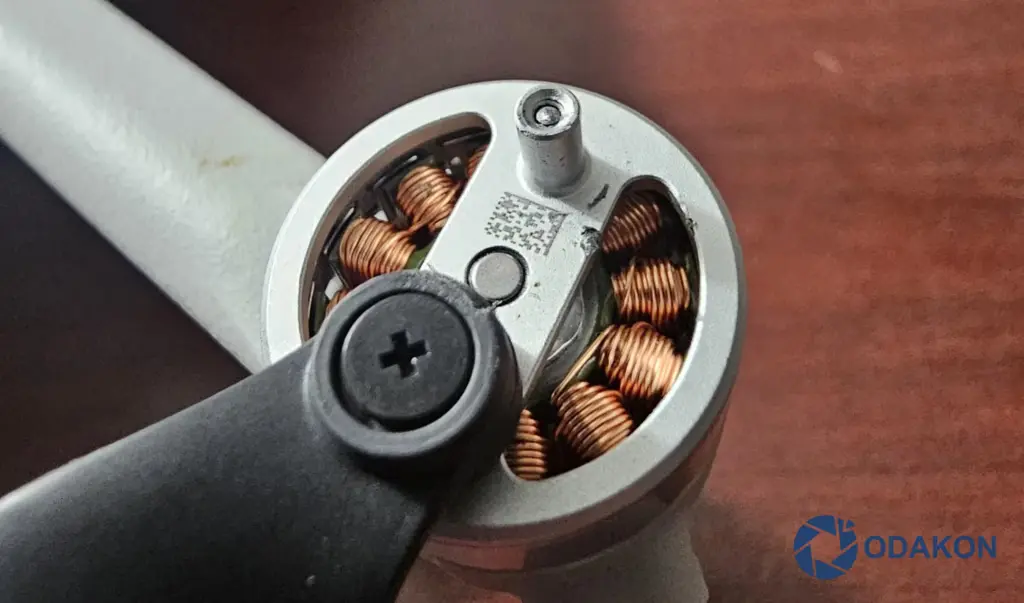
DJI drone motors consist of very thin, enamel-coated copper wires wound with millimetric precision. Because these motors have an “outrunner” (externally rotating) design, dust and particles can easily enter them.
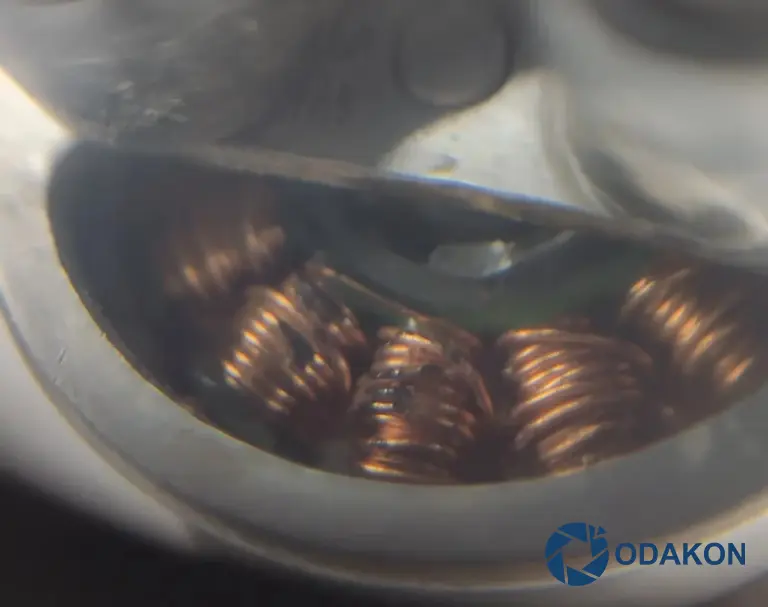
- Foreign Object-Related Breakage: Even a single grain of sand entering the motor during landing or takeoff can cause catastrophe. While the motor spins at high RPM (e.g., 5,000–8,000 RPM), that tiny grain of sand acts like a blade or sandpaper.
- Result: This friction gradually strips the enamel coating from the copper wires or completely breaks the wire. When winding integrity is compromised or the windings short-circuit to the housing, the ESC board detects abnormal resistance and triggers the error to protect itself.
ESC Board and MOSFET Failures
The heart of the ESC consists of components called MOSFETs (Metal-Oxide-Semiconductor Field-Effect Transistors) that switch the electricity going to the motors on and off thousands of times per second. These components are one of the main sources of the error.
- Strain and Overcurrent: If even one propeller hits a branch slightly, gets caught in grass, or the motor’s rotation is physically blocked, the motor tries to draw excessive current from the battery to keep spinning.
- MOSFET Burnout: This sudden and high current demand exceeds the capacity of the MOSFETs on the ESC. These components overheat within seconds and burn out or pop. A burned MOSFET cannot complete the circuit and causes a permanent ESC error. This is usually accompanied by a faint burnt electronics smell from the drone.
Impact and Solder Cracks (Cold Solder)
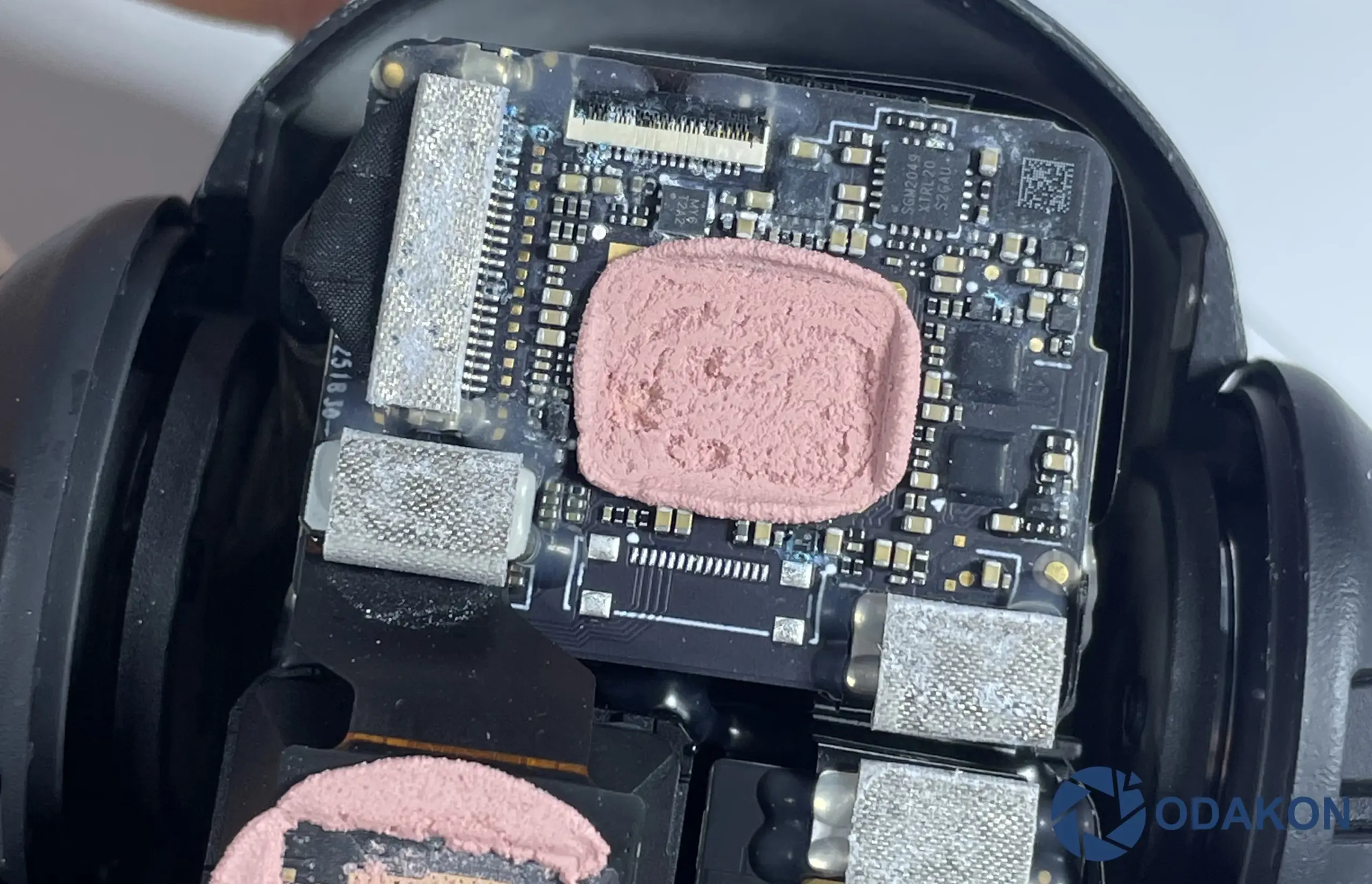
After a hard landing or crash, the drone may look perfectly fine from the outside. However, the inside may tell a different story.
- BGA and Solder Cracks: ESC chips or power ICs are connected to the main board via solder balls (BGA) or pins. A hard impact can create microscopic cracks (hairline cracks) in these solder points that are impossible to see with the naked eye.
- Loss of Contact: These cracks expand due to heat when the drone warms up, causing intermittent contact loss. While the drone may appear to work fine on the ground, once airborne and vibration begins, the circuit breaks and triggers the ESC error.
DJI ESC Error Fix Methods
Before seeking service support, you can try to resolve the issue by following the steps below in order.
Check the Propellers and Motors
The most common and simplest cause is physical obstruction preventing the motors from spinning.
Remove the propellers. Gently spin the motors by hand. Do they all spin with the same smoothness? If one motor feels stiff or makes a “grinding” sound, dust or sand may have gotten inside. Try cleaning with compressed air.
Firmware Update and Refresh
The DJI ESC status error warning usually doesn’t respond positively to this, but it’s worth trying. To update or reinstall the firmware, follow these steps using a computer rather than the controller or phone:
- Download the DJI Assistant 2 program to your computer.
- Connect the drone to the computer via USB cable and open the program.
- Go to the “Firmware Update” section.
- If an update is available, install it. If it’s already current, click the “Refresh” button next to the current version. This process reinstalls the ESC firmware from scratch and may fix errors. But keep your expectations low, as a hardware failure is usually the case.
Cable and Connection Check (Advanced)
If you’ve experienced a crash before, there may be intermittent contact in the cables between the ESC board and motors. In this case, the best step you can take is to check the motor windings—there are orange cables on the propeller-mounting side of your motors. Check the condition of the cables for any disconnection or impact marks. If this is the issue, you’ll need to send the device to a service center.
ESC Calibration
Some older drone models used to require ESC calibration. However, DJI’s new generation drones (Mavic Mini, Mini 3, Mavic 3, Air 2, Mavic 2, Phantom 4, etc.) generally perform automatic calibration. Currently, there are no drones that allow manual ESC calibration, so we can safely skip this topic.
What Do DJI ESC Beep Sounds Mean?
The “beep-beep” sounds coming from the motors when you turn on the drone are like Morse code.
- Continuous Beeping: Usually indicates that the throttle stick isn’t at its lowest position or the connection between the controller and drone has been lost. Beeping may also occur after flying in windy conditions or with a broken propeller—this is only a warning and usually resolves after propeller replacement.
- Intermittent Beeping: Indicates the ESC is experiencing a voltage issue or the software doesn’t recognize the motor—service is required.
Critical Diagnosis: Burn Smell
Sometimes, even without visible damage, your nose can tell you the source of the problem. Burning electronic circuits emit a distinctive, sharp, acrid smell. This is the most definitive evidence of a hardware failure.
- Why Does It Smell?
- Motor Varnish: When motor windings overheat (due to short circuit or strain), the protective varnish (enamel) insulating the copper wires begins to melt. This melting emits a characteristic chemical odor.
- Epoxy and Silicone: When MOSFETs on the ESC board burn, the black epoxy coating on them or the circuit board itself gets scorched. This smell is much sharper and doesn’t dissipate easily.
- How to Perform a Smell Test: With the device off, bring your nose close to each motor’s ventilation openings and take a deep breath.
- Healthy Motor: Gives a mild metallic or neutral, odorless air.
- Faulty Motor: Emits a sharp, bitter, burnt plastic/wire smell.
WARNING: If you detect this burnt smell from your drone or motors, absolutely do not try inserting a battery and powering it on again. The energy you apply hoping “maybe it’ll fix itself” can cause the burnt area to draw more current and burn other healthy components on the main board (such as the power distribution unit). Burnt smell = Part replacement is mandatory.
Frequently Asked Questions
Why does the DJI ESC Status Error appear?
Can the DJI ESC error be fixed with a software update?
What does a burning smell from the drone mean?
How long does DJI ESC error repair take?
When Should You Send It to Service?
If the “ESC Error” warning persists despite trying all the steps above, or if you detect a burnt smell from the drone, the issue is likely hardware-related. The ESC board may be burned. In this case, contacting a service center is the healthiest course of action.
Summary
Although the DJI ESC error may look intimidating, it can usually be resolved with motor cleaning. Don’t neglect periodic maintenance to fly your drone safely!