
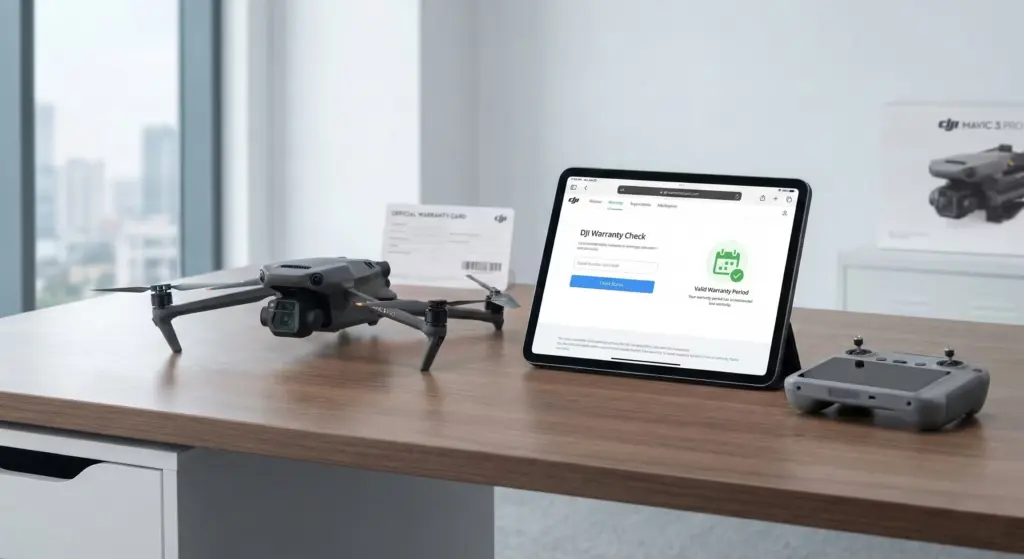
We know that feeling of excitement when you first get a new drone. Unboxing it, peeling off the protective films, and taking to the skies is an incredible experience. However, unfortunate situations are part of the nature of drone piloting. A moment of carelessness, a sudden gust of wind, or signal loss can instantly turn that excitement into worry. And that’s when the first question comes to mind: “Is my warranty still valid?” or “Will the warranty cover this damage?”
There’s a lot of confusing information circulating online about DJI drone warranty check procedures. Some sources claim that devices purchased abroad have no warranty, while others suggest that all types of crashes are covered. As the Odakon Drone Service team, with experience from thousands of devices that have come through our workshop, we want to bring clarity to this topic. Having access to accurate information is crucial, especially when buying a second-hand device or when you don’t know what to do after a crash.
In this guide, we’ll explain how you can check your device’s warranty status in seconds, where serial numbers are hidden, and what warranty covers — and doesn’t cover — in full transparency. If you’re ready to trace clues like a detective, let’s shed light on your device’s past and future.
Where to Find the DJI Serial Number (S/N)
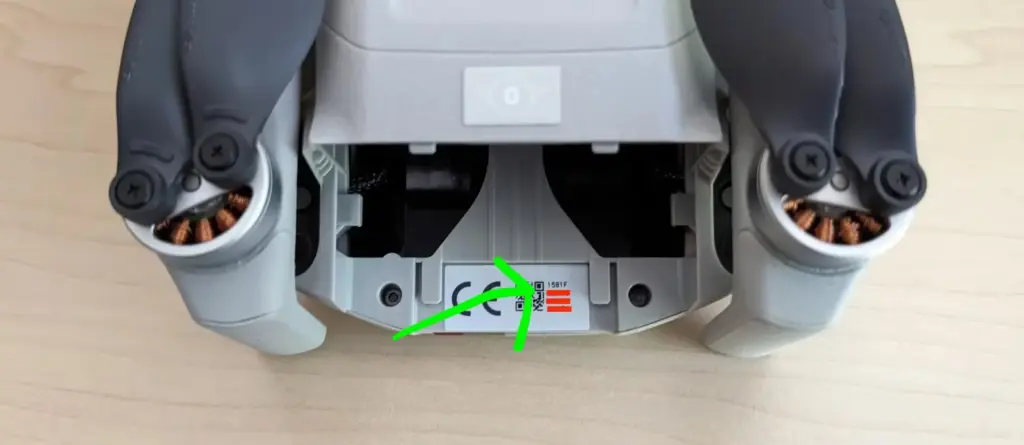
Checking the warranty status is like a patient looking up their test results with an ID number. In the DJI world, this ID number is the Serial Number (S/N), consisting of 14 alphanumeric characters (may vary on some older models). To perform a DJI serial number check, you first need to correctly identify this number. Finding these locations, which vary from model to model, can sometimes be challenging.
There are three main places where you can find the serial number:
1. Physical Label on the Drone Body
The most reliable method is reading the label on the device. However, DJI engineers sometimes place these labels in very hidden spots for aesthetic reasons. Here’s where to look based on your model:
- DJI Mini Series (Mini 2, Mini 3 Pro, Mini 4 Pro): Usually found on the inside of the battery compartment cover when opened, or on the inner wall of the compartment after removing the battery.
- Mavic Series (Mavic 3, Air 2S, Air 3): Inside the battery slot or on the lower body section just behind the gimbal, next to a small square barcode.
- Avata and FPV Series: Usually on the inside of the battery slot or on the plastic protection underneath the body.
- Enterprise Series (Matrice, etc.): Found on labels near the rear arm connection points or in the area with the input ports.
2. Barcode on the Original Box
If your device has been damaged and the label on it is unreadable (or you don’t have the device with you), the original box can be a lifesaver. The number starting with “S/N:” on the white barcode label on the side or bottom of the box is the code you’re looking for. When buying second-hand, checking whether the number on the box matches the number on the device is the best way to ensure you’re not getting a refurbished unit.
3. Checking via DJI Fly App
If your device is operational and connected to the controller, you don’t need to bother reading physical labels. Accessing the serial number through software is the most definitive method. Follow these steps:
- Turn on the drone and controller and establish the connection.
- Open the camera view (Go Fly) in the DJI Fly app.
- Tap the three dots (…) in the top right corner to open the settings menu.
- Navigate to the “About” tab.
- Scroll down to find “Flight Controller SN” — this is the main serial number you’ll use for the warranty check.
An important detail to note: The battery serial number or controller serial number are different. For warranty queries, always use the “Flight Controller” or general “Device” serial number.
Step-by-Step DJI Warranty Check Process
If you’ve noted down your serial number, it’s time to check your device’s official status. We’ll be using DJI’s global database for this. Although there are many third-party sites online, the most accurate data always comes from the manufacturer’s own service portal.
Follow these steps to perform a DJI drone warranty check:
Step 1: Access the Official Check Page
Go to the following address in your browser: DJI Warranty Check. This link takes you to DJI’s global service tracking and warranty check screen.
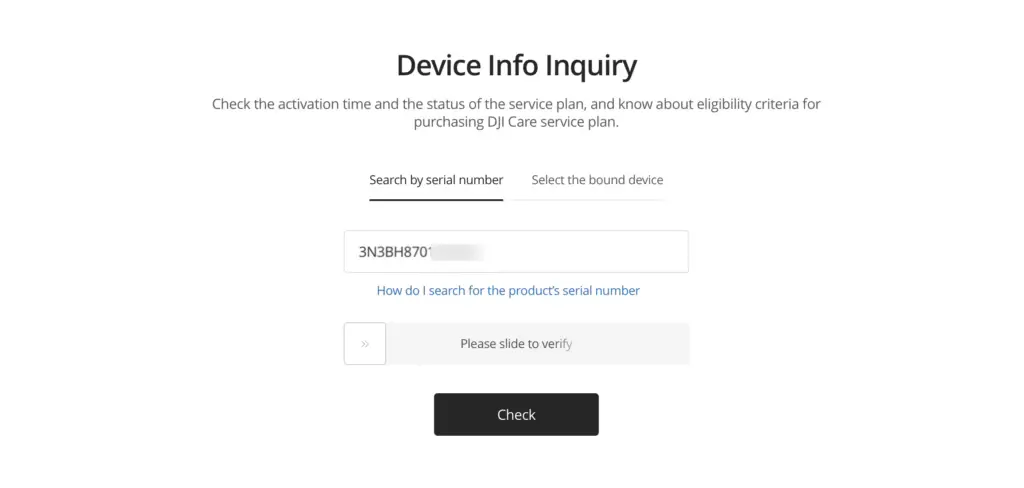
Step 2: Serial Number and Verification
On the screen that appears, enter the 14-digit code we found earlier in the “Serial Number” box without any errors. You don’t need to worry about case sensitivity, but be careful not to confuse “0” (zero) with “O” (the letter O). DJI serial numbers generally use “0” (zero). After entering the security code (Captcha) below, click the “Search” button.
Step 3: Interpreting the Results
The query results will show the device model, color, and most importantly, the “Activation Date.” This date is the starting point of your warranty.
- Active: The device has been previously set up, linked to an account, and activated. The warranty period begins from the date shown here.
- Not Active: The device has never been set up. It is a truly “brand new” sealed box device. The warranty will begin when you first set it up and connect to the internet.
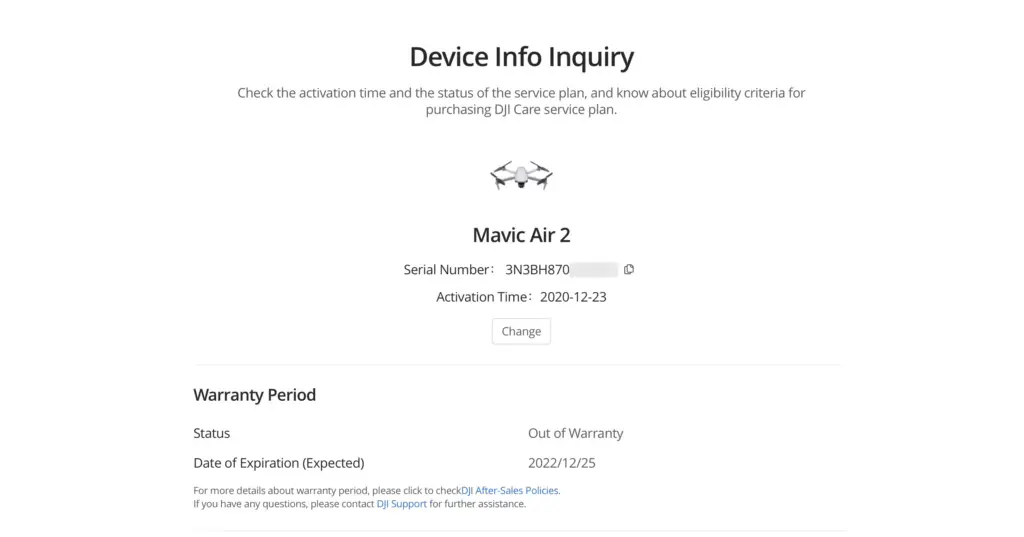
On this screen, you can also see whether you have a “DJI Care Refresh” package and, if so, how much time remains. If you’re buying a second-hand device and the seller says “I only used it for 1 month,” you can verify their claim by checking the activation date here. We’ve often discovered through this screen that devices claimed to have been used for just 1 month were actually activated over a year ago.
DJI Standard Warranty Coverage: What Does It Include?
Now we’ve arrived at the most crucial and most misunderstood topic. You saw on the query screen that your warranty is still active — but what does that actually mean? DJI warranty coverage has significant differences between what users imagine and what actually applies.
DJI’s standard warranty is fundamentally protection against manufacturing defects. If there’s a factory-origin issue, DJI will repair it for free or replace the device. However, since drone use is a risky hobby, manufacturers keep warranty coverage quite strict.
Situations Covered by Warranty
Although rare, situations we’ve encountered that are processed under warranty include:
- Device not turning on at all out of the box (DOA – Dead on Arrival).
- Device spontaneously stopping motors mid-flight without any external factors, wind warnings, or pilot error (must be proven through log records).
- Gimbal vibrating or ceasing to function without any impact.
- Battery completing its lifespan or swelling before reaching the advertised cycle count (if there’s no user error).
The Reality: User Error and Out-of-Warranty Situations
In authorized service procedures and general DJI policies, 99% of crash-related damage is considered out of warranty. Based on our experience as a specialized service center, the following situations are not covered by standard warranty:
- Impact and Falls: You hit a tree, scraped a wall, or landed hard. These situations are classified as “pilot error.”
- Crashes Due to Signal Loss: If the device crashes into something while performing RTH (Return to Home) after losing signal, it’s not covered under warranty because environmental awareness is the user’s responsibility.
- Liquid Contact: If the device was flown in rain or fell into water, the liquid contact indicators on the motherboard change color and the device immediately falls out of warranty.
- Sport Mode Crashes: Crashes that occur in modes where sensors are disabled are the user’s responsibility.
In summary: if your drone has taken physical damage, a broken arm, or a detached gimbal, you shouldn’t expect “free warranty repair” when you go to an authorized service center. In such cases, authorized services generally don’t repair individual parts as standard procedure — they recommend complete module replacement (such as replacing the entire arm or motherboard). This significantly increases repair costs.
Warranty Validity for Devices Purchased Abroad
High drone prices due to taxes drive many users to purchase devices from abroad. But is the warranty of a device bought in the US or Europe valid in other countries? This question is one of the most frequently asked under the topic of DJI international warranty.
Short answer: No.
DJI’s standard warranty is regional. A device purchased in the US is only warranted in the North American region. An authorized service center in another country may refuse to repair a device with a foreign invoice under warranty or may apply a paid service procedure. In some cases, you may be able to get international support, but bureaucratic processes and shipping wait times can be quite lengthy.
The biggest risk for owners of devices purchased abroad is the fear of having no point of contact in case of a manufacturing defect. However, as mentioned above, since most crashes are due to user error, you’ll likely have to pay out of pocket even if your device has local warranty. Therefore, if you own a device purchased abroad and have had a crash, choosing a competent independent service center instead of the authorized service center’s “out-of-warranty” procedures will protect your budget.
Out-of-Warranty Situations and Independent Service Solutions
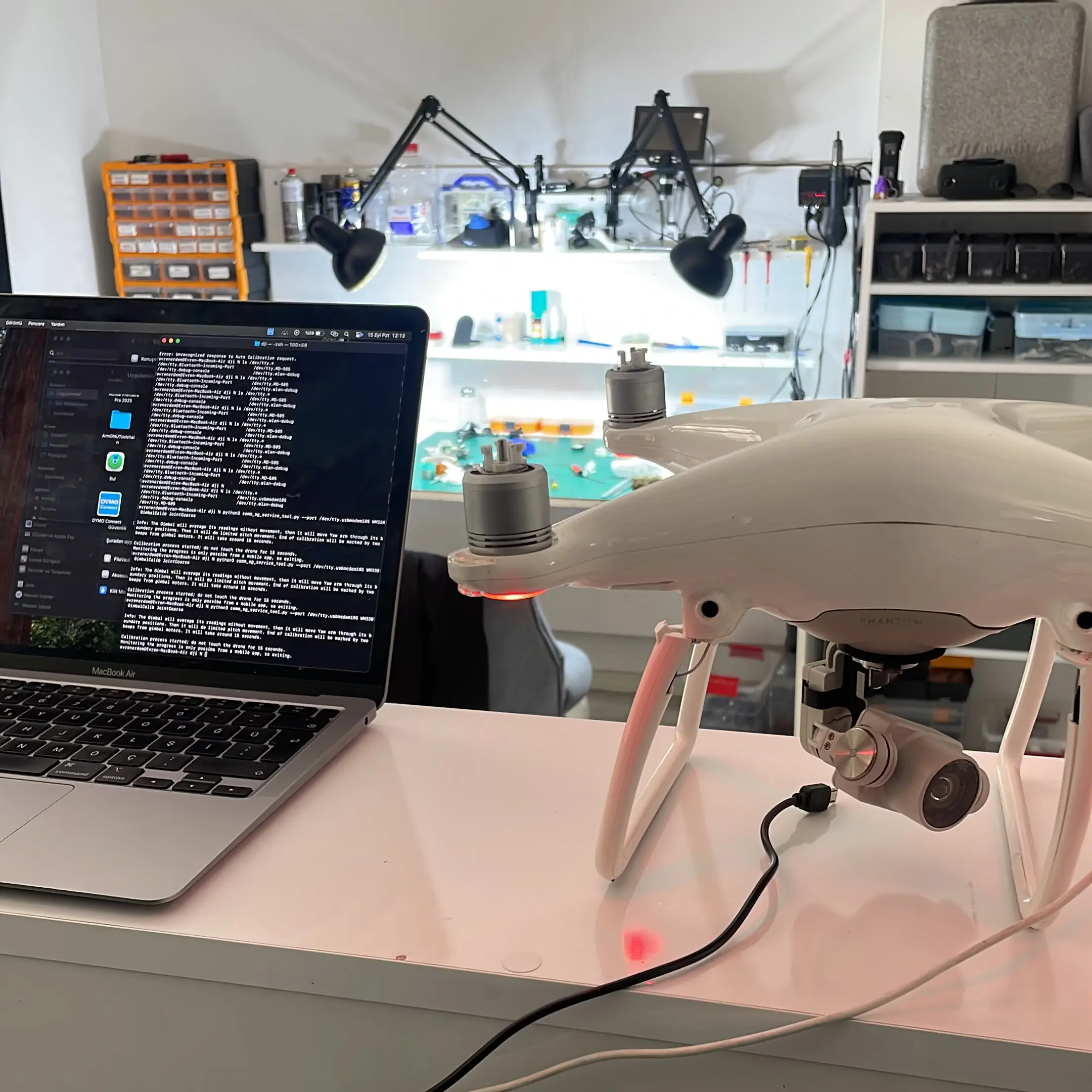
You’ve crashed your drone, checked the serial number, and learned that the warranty has expired or the damage isn’t covered. Now what? When you go to an authorized service center, they generally operate with a “replacement” mindset rather than “repair.” For example, if just one motor coil has burned out, authorized service procedures may require replacing the entire arm that motor is attached to. Or if there’s a small chip failure on the motherboard, they’ll request the complete board be replaced. This can cause the repair bill to approach half the device’s price.
Odakon DJI Drone Service
This is where we step in! The days of waiting for days when sending your device to service are over — now you receive a fault diagnosis report as a PDF on the same day! Service tracking is also available through our management system app!
- Fault Diagnosis Report
- 24/7 Communication
- 6-Month Warranty Certificate
- Protection Package Application
As the Odakon Drone Service team, we are not an “authorized service center” — we are a specialized independent service center. Here are the advantages this provides you:
- Precision Repair: Instead of replacing the entire faulty part, we prefer to repair it when possible. This significantly reduces costs.
- Speed: We don’t have the bureaucratic approval processes and overseas parts waiting times of authorized services. We work with stock and get your device back in the sky as quickly as possible.
- Economical Solutions: For devices with expired warranty or those that have fallen out of warranty due to user error, we provide solutions with original parts at prices well below what authorized services charge.
- Transparency: You’ll know exactly what was done and where on your device. We avoid unnecessary part replacements.
Independent service centers are a lifesaving alternative, especially for users who face high pricing policies from the authorized service network. If your device has crash-related damage and you don’t have a Care Refresh package, you can save both time and money by choosing us. Remember, the warranty protects you against manufacturing defects, not trees — we’re here for the trees.
What to Look Out for When Buying Second-Hand
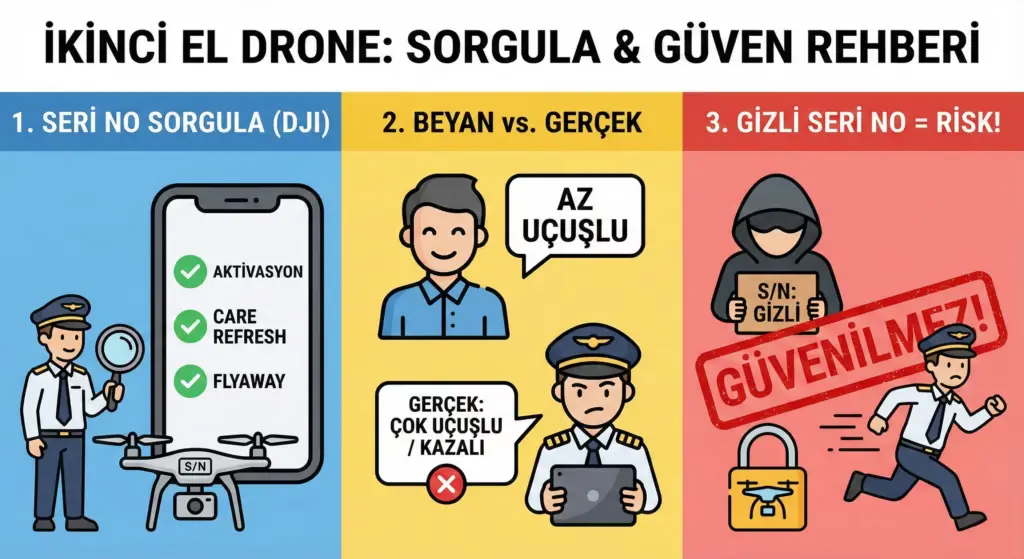
The warranty check process is critically important not just for your current device, but also for second-hand drones you’re considering purchasing. There are devices on the market advertised as “like new” that have actually logged hundreds of flight hours or been assembled after a serious crash.
Before making a purchase, always ask the seller for the serial number and perform these checks:
- Activation Date: Does it match the usage period the seller claims?
- Care Refresh Status: Does the device have a transferable insurance package?
- Flyaway Query: Has the device been previously reported as “lost/stolen”? (In this case, the device may be locked and you won’t be able to use it).
If the seller refuses to provide the serial number, we recommend staying away from that device. Performing a check for a transparent transaction and safe flights is a pilot’s most fundamental responsibility.
Frequently Asked Questions
What should I do if my DJI drone warranty has expired?
Does a crash-damaged drone fall under warranty?
Is a DJI drone purchased abroad covered by local warranty?
Can DJI Care Refresh be purchased later?
Where is the DJI drone serial number written?
How do I find the DJI battery charge cycle count?