

In-depth technical guide
DJI battery lifespan management from cell chemistry to storage protocol
LiPo vs Li-ion architecture, BMS firmware behavior, swelling prevention, optimal charge-discharge cycles, and long-term storage rules — everything that determines whether your $200+ battery lasts 100 or 400 flights.
DJI Smart Battery Technology: A Comprehensive Technical Guide on BMS Architecture and Lifespan Management
In the Unmanned Aerial Vehicle (UAV) industry—particularly in the civilian and commercial segment dominated by DJI (Da-Jiang Innovations)—energy storage units have evolved from simple power sources into complex avionics components that directly determine flight safety. What many users simply call a “drone battery,” those gray or black boxes that clip onto the back of the aircraft, are technically defined as “Intelligent Flight Batteries” in engineering literature. These units form the heart of the system with their embedded microcontrollers, Power Management Integrated Circuits (PMIC), and advanced electrochemical cells.
We will provide an in-depth analysis of DJI battery technologies, the lesser-known aspects of lithium-based chemistry, and the critical factors that determine the lifespan of these components—which can cost upwards of $200. This data, uncovered through field experience and laboratory analysis rather than standard user manuals, is vital for both amateur and professional pilots.
Electrochemical Architecture: The Critical Differences Between LiPo and Li-ion
DJI engineers specifically select the battery chemistry based on the flight characteristics (speed, lift capacity, or flight duration) of each drone model they produce. Knowing which chemical architecture your battery employs is the first step to understanding its potential failure modes and performance limits.
Lithium Polymer (LiPo): High Performance and Aggressive Power
This technology, preferred in high-performance models such as the Phantom 4 series, Inspire 1/2, DJI FPV, and Avata, uses a polymer gel instead of liquid as its electrolyte.
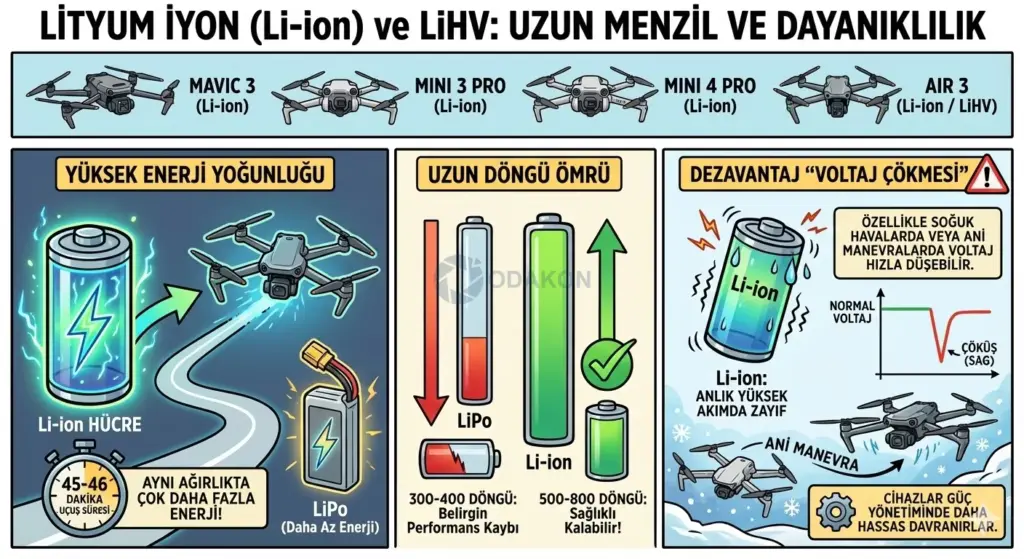
- High C-Rating (Discharge Capacity): LiPo batteries can deliver very high current instantaneously. This provides the “torque” needed for the drone to resist wind, accelerate rapidly in “Sport Mode,” or lift heavy payloads.
- Voltage Stability: They maintain more stable voltage under load, meaning less voltage sag occurs during sudden throttle inputs.
- Major Disadvantage — “Swelling”: The biggest drawback of LiPo chemistry is its very low tolerance for improper use. When stored fully charged or subjected to excessive heat, the electrolyte inside the cell decomposes and releases gas. This gas becomes trapped inside the pack, causing the battery to physically swell. A swollen battery doesn’t just fail to fit in its bay—it’s also a ticking time bomb with explosion risk.
LiPo (Polymer)
High C-rate, aggressive power delivery. Used in Phantom 4, Inspire, FPV, Avata. Prone to swelling if stored fully charged.
Li-ion / LiHV
Higher energy density, longer range. Used in Mavic 3, Mini 3/4 Pro, Air 3. More tolerant of storage but still needs proper care.
Lithium-Ion (Li-ion) and LiHV: Long Range and Durability
This technology (typically using 18650, 21700 cylindrical or prismatic cells), found in modern consumer series like the Mavic 3, Mini 3 Pro, Mini 4 Pro, and Air 3, follows a different strategy compared to LiPo.
- High Energy Density: Li-ion cells store significantly more energy per unit weight compared to LiPo. This chemical shift is the primary reason the Mavic 3 series achieves 45-46 minute flight times.
- Long Cycle Life: While LiPo batteries show significant performance degradation at 300-400 cycles, quality Li-ion packs can remain healthy for 500 to 800 cycles.
- Disadvantage — “Voltage Sag”: Li-ion cells don’t handle high instantaneous current demands as well as LiPo. Their voltage can drop more rapidly, especially in cold weather or during sudden maneuvers. For this reason, devices using these batteries employ more sensitive power management.
The Brain of the Battery: BMS (Battery Management System) Architecture
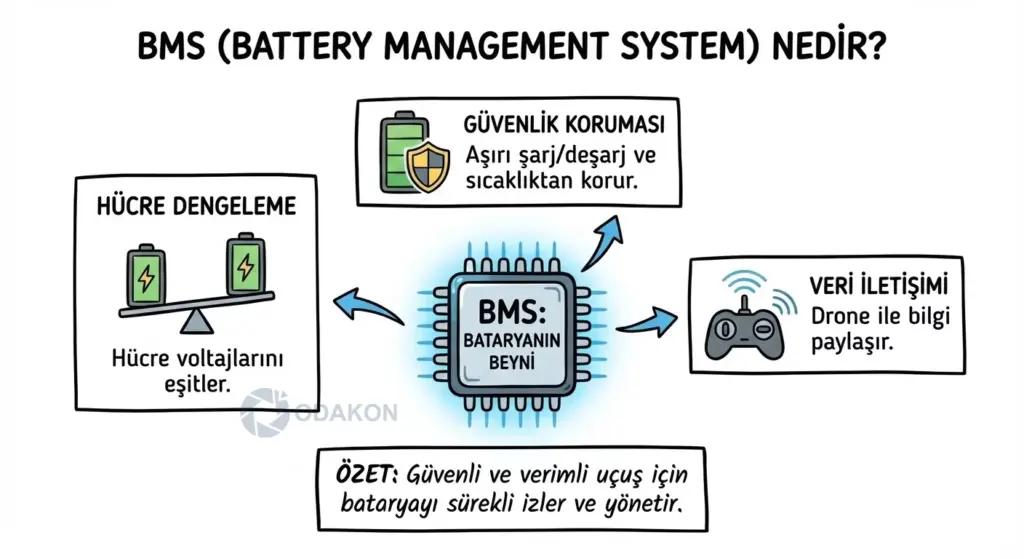
What makes DJI batteries “smart” are the BMS boards integrated on top of the cells, which exchange data with the main flight controller hundreds of times per second. Equipped with chips typically manufactured by Texas Instruments (e.g., BQ30Z55 or BQ9003 series), these boards manage not only the charging/discharging of the battery but also its health and safety.
Cell Balancing Technology
When all cells in a battery pack are connected in series, their voltages must be equal with millivolt (0.001V) precision. The BMS activates toward the end of the charging process and performs “Passive Balancing.” It slightly discharges the cell with a higher voltage than others through onboard resistors with very small currents, equalizing it with the rest.
- Why Is This Important? If balancing isn’t performed, one cell might reach 4.35V (fully charged) while another stays at 4.10V. This imbalance can cause the battery to suddenly cut off during flight.
Protection Protocols and the “Brick” (Lockout) Condition
The BMS has ruthless rules to ensure battery safety. If any of the following conditions occur, the BMS chip sets the “Permanent Failure” (PF) flag and shuts down the MOSFETs (electronic switches), locking the battery:
- Critical Low Voltage (Deep Discharge): If cell voltage drops below 1.5V – 2.5V.
- Overvoltage (Overcharge): If cell voltage exceeds safe limits during charging.
- Short Circuit: If an extremely high current is drawn instantaneously.
- Cell Imbalance: If the difference between cells exceeds the safe margin (typically 0.1V – 0.15V).
Users typically perceive this lockout condition as “my battery died, the lights won’t turn on.” In reality, this is the BMS saying “this battery is no longer safe; I cannot allow you to use it.”
Lifecycle Analysis: When and Why Does a Battery Die?
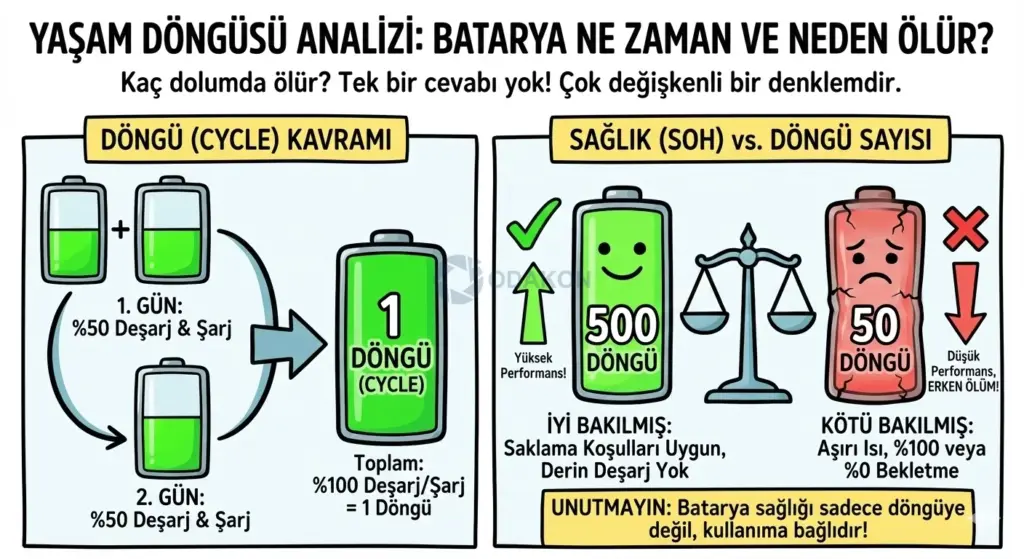
The most frequently asked question, “How many charges before the battery dies?”, is a multi-variable equation without a single numerical answer. Battery health (SOH — State of Health) depends not only on the cycle count but also on the depth of use and storage conditions.
Understanding the Cycle Concept
A cycle is defined as discharging 100% of the battery’s total capacity and then recharging it. This doesn’t have to happen in a single session. For example, if you used 50% on day one and recharged, then used 50% again on day two and recharged—that counts as 1 Cycle.
- However, a well-maintained battery with 500 cycles can outperform a poorly maintained one with only 50 cycles.
Chemical Processes That Kill Batteries: Storage Errors
The greatest enemy of lithium batteries isn’t flying—it’s sitting idle.
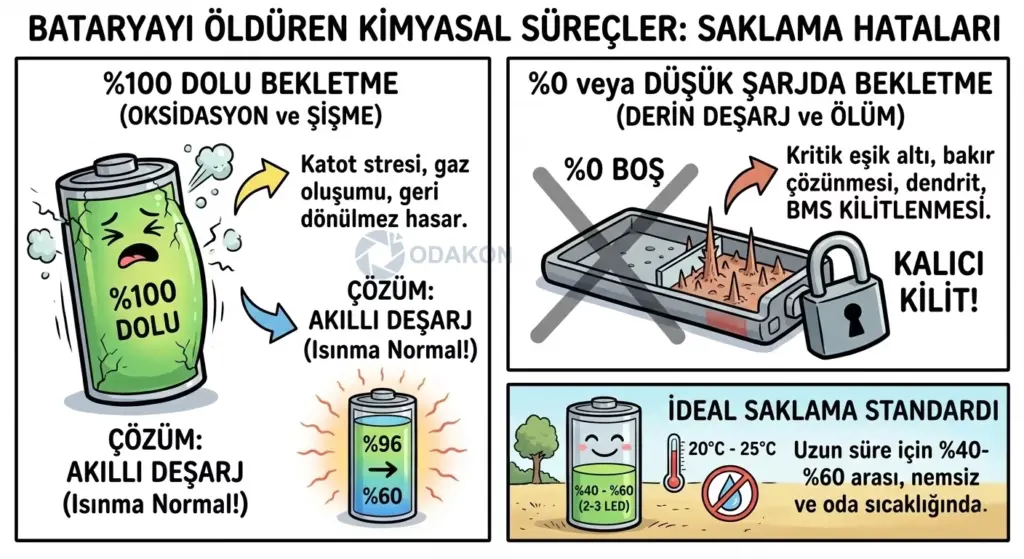
- Storing at 100% Charge (Oxidation and Swelling): When the battery is fully charged, the voltage stress on the cathode is at maximum. Lithium ions become unstable and react with the electrolyte, releasing oxygen and other gases. These gases swell the battery pack. Swelling is irreversible physical damage.
- Solution: DJI batteries activate their “Smart Discharge” feature when not in use (typically after 3-9 days), automatically reducing the charge to 96% or 60%. The battery warming up during this process is normal—it indicates energy is being converted to heat and dissipated.
- Storing at 0% or Low Charge (Deep Discharge and Death): If a battery is shelved while empty, the cells’ self-discharge property, combined with the micro energy consumed by the BMS circuit, causes the voltage to gradually drop below the “critical threshold.” Once the voltage falls below this limit, the copper current collectors inside the cell begin to dissolve, forming dendrites (short-circuit bridges). The BMS, aware of this danger, permanently locks the battery. These batteries will never accept a charge again.
Ideal Storage Standard: If you won’t be flying for an extended period, store your batteries at 40% – 60% charge level (typically when 2 or 3 LEDs are blinking), in a dry environment at room temperature (20°C – 25°C / 68°F – 77°F).
During winter months, you need to be careful not just with your battery but with your entire drone. Make sure to read our Flying Drones in Cold Weather guide to avoid any issues!

Advanced Health Diagnostics: Beyond App Data
The “Battery Status: Normal” text you see in the DJI Fly app doesn’t guarantee your battery is 100% healthy. To analyze battery health with a professional eye, you should examine these two metrics:
Cell Voltage Deviation
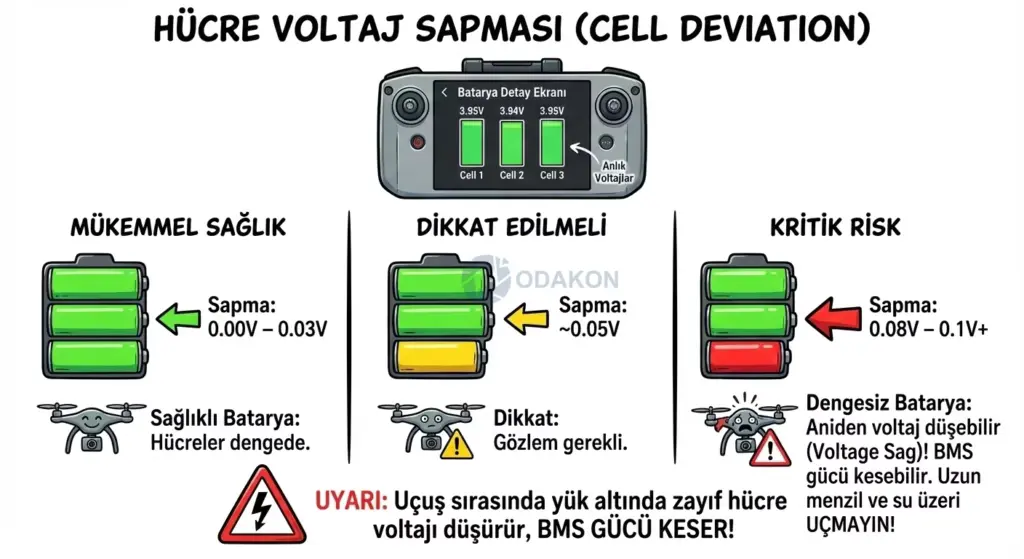
In the battery detail screen within the app, you can view cell voltages (Cell 1, Cell 2, Cell 3…) in real-time. In a healthy battery, all cells should read very close to each other.
- Excellent Health: Deviation is between 0.00V – 0.03V.
- Needs Attention: Deviation is around 0.05V.
- Critical Risk: If the difference between cells reaches 0.08V – 0.1V or higher, this battery is “unbalanced.” During flight, the weaker cell will suddenly drop voltage under load, causing the BMS to cut power. Long-range or over-water flights should not be attempted with such batteries.
Internal Resistance (IR)
The clearest indicator of battery aging isn’t capacity loss—it’s internal resistance increase. Internal resistance is the difficulty the battery encounters within itself when delivering current.
- New Battery: Less than 5 milliohm (mΩ) per cell.
- Worn Battery: 15 – 20 mΩ.
- Should Be Retired: Greater than 25 mΩ. A battery with high internal resistance, even when showing full charge, will experience sudden voltage drops when full power is applied to the motors (Sport Mode), triggering early landing warnings.
Winter Operations and the “Voltage Sag” Phenomenon
The nightmare scenario most frequently experienced by pilots flying drones in winter goes like this: “My battery was at 50%, there were no errors on screen, but the drone suddenly lost power and fell.“ The culprit isn’t the battery’s capacity (mAh) running out—it’s Voltage Sag.
The Physics of Cold Weather: Arrhenius Effect and Internal Resistance
Lithium batteries generate electricity through chemical reactions. When the temperature drops (especially below 10°C / 50°F), the viscosity of the chemical fluid (electrolyte) inside the battery increases, and the mobility of lithium ions decreases. This causes the battery’s Internal Resistance (IR) to increase exponentially.
How Does the Crash Mechanism Work?
- Environment: Air temperature is 0°C (32°F), battery was inserted cold (15°C / 59°F).
- Trigger: The pilot makes a sudden maneuver, switches to “Sport Mode,” or tries to fly against the wind (High Current Demand).
- Collapse: According to Ohm’s Law, when the high current drawn is multiplied by the increased internal resistance, a massive voltage drop occurs.
- Result: Even though the battery shows 60% charge, the terminal voltage momentarily drops below the BMS’s critical shutdown threshold (3.0V – 3.2V per cell).
- Outcome: The BMS shuts down the system to protect the cells from permanent damage, or the drone initiates a forced landing with a “Critical Low Voltage” warning.
3 Life-Saving Protocols for Winter Flying
The secret to safe winter flying lies not in tricking the battery, but in respecting the laws of physics.
- Pre-heating: Never insert cold batteries into the drone and take off. Keep them warm in your pocket (body heat) or your car’s heater on the way to the flight location. The battery temperature should be at least 20°C (68°F) before takeoff. While professional devices like the DJI Inspire 2 have “Self-Heating” capability, for the Mini and Air series, this responsibility falls on you.
- Hover Warm-up: Don’t gain altitude and fly away immediately after takeoff. Keep the drone hovering at about 1-2 meters (3-6 feet) for approximately 1 minute. As the battery delivers current, it will heat up due to its own internal resistance (Joule Heating). Confirm from the app that the battery temperature has risen above 25°C (77°F).
- Gentle Operation: Using “Sport Mode” in cold weather is like playing Russian roulette. Avoid sudden throttle inputs and hard braking. When your voltage gauge enters the yellow zone (3.5V), return immediately and land, even if your charge shows 40%.
Model-Specific Chronic Issues and Design Vulnerabilities
Each DJI series has its own set of “chronic” issues due to body design and battery integration. Based on service records, here’s what you should watch out for:
DJI Mini 3 Pro / Mini 4 Pro: Mechanical Vulnerability and Overheating
- Latch Breakage: These devices are manufactured from very lightweight materials to stay under the 249g limit. The plastic latches that lock the battery into the body fatigue over time and can crack. If a latch breaks during a sudden maneuver in flight, the battery shifts out of position and power is cut.
- Action: Before every flight, flex and inspect the battery latches.
- Action: Before every flight, flex and inspect the battery latches.
- Update Overheating: The Mini series has no internal fan; it relies on the airflow created by the propellers for cooling. During ground updates, the battery and processor overheat significantly. The system may shut down as a protective measure.
- Action: Point an external fan at the drone during firmware updates.
DJI Air 3: Charging Hub and Reverse Current
- Reverse Charging Issue: The Air 3’s charging hub has “Power Accumulation” and power bank functionality. However, the USB PD (Power Delivery) protocol can sometimes get confused. When connecting the hub to a power bank, instead of charging the batteries, it may drain energy from the batteries into the power bank.
- Action: After plugging in, make sure the LEDs are moving in the “charging” direction.
DJI Mavic 3 Series: Aggressive Discharge and Warm Bag
- Situation: Mavic 3 batteries follow a very aggressive “smart discharge” strategy to minimize swelling issues. When not in use, they drop to 96% after 3 days and 60% after 9 days.
- Observation: During this process, the battery converts energy to heat. Your bag feeling warm is not a defect—it indicates the system is working correctly and the battery is protecting itself.
DJI Avata and FPV: Sudden Voltage Drops
- Situation: FPV drones draw very high current (Burst) by nature. During aggressive maneuvers in manual mode, instantaneous voltage can drop below 3.2V even at 30% battery level, triggering a “Land Now” warning in the goggles.
- Action: In FPV flights, 30% battery isn’t the limit for “Return to Home”—it’s the limit for landing.
“Dead” Batteries, Bricking, and Recovery Methods
A significant portion of batteries that users consider “broken” and think about throwing away are actually only software-locked.
Why Does the BMS Lock? (PF Flags)
The BMS (Battery Management System) never compromises on safety. If the cell voltage drops below the critical level (1.5V – 2.5V), the BMS chip (BQ9003, etc.) raises the “Permanent Failure” (PF) flag. In this state:
- The battery shows no response when connected to the charger.
- LEDs don’t light up, or only the last LED blinks rapidly.
- The drone doesn’t recognize the battery.
CP2112 and Software Intervention: Myth or Reality?
In technical communities, “Unbrick” procedures using the “DJI Battery Killer” or CP2112 USB-SMBus adapter are popular. This method can “wake up” a battery by resetting the BMS.
WARNING AND RISK ANALYSIS: This procedure essentially tells the battery’s brain “my cells are fine, clear the error.”
- Acceptable Scenario: The battery is physically sound but its voltage dropped below the threshold because it sat on a shelf too long. If the cells are slowly trickle-charged and the BMS is reset, the battery can be recovered.
- Fatal Risk: If one of the cells is physically damaged, its chemistry has degraded, and you use software to tell it “this battery is fine”—you have a very high risk of causing a fire (Thermal Runaway) during the first charge or flight. This procedure requires professional equipment and expertise.
Is Cell Replacement (Re-celling) Worth It?
Some service centers preserve the original DJI board and install new cells (Samsung, Sony, etc.) underneath to refurbish the battery.
- Risk: The BMS is calibrated to the original cells’ capacity and discharge curves. It may not fully recognize the new cells. The drone might suddenly drop from 30% to 0% in mid-air. Non-original repairs should not be used for professional operations.
Final Thoughts: The Battery Is Your Drone’s Insurance Policy
Remember: no matter how powerful your motors are or how precise your GPS is, the only thing keeping you in the air is the chemical reaction inside your battery. Proper battery maintenance and correct usage reduces crash risk by up to 80%. Don’t risk your multi-thousand-dollar equipment and surrounding safety on a suspicious, swollen, or unbalanced battery.
We wish you safe and enjoyable flights.