
Troubleshooting reference
Every DJI Mini error code decoded — from an engineering perspective
GPS failures, IMU drift, ESC overloads, gimbal faults, and battery errors. This guide covers the complete 300xx–400xx error code range for DJI Mini 2, Mini 3, Mini 3 Pro, and Mini 4 Pro — with root-cause analysis and repair recommendations.
DJI Mini Series (Mini 2, 3, 4 Pro) Error Codes — Complete Troubleshooting Guide
As Odakon Technical Service, we’ve compiled all the error codes that DJI Mini series (Mini 2, Mini SE, Mini 3, Mini 3 Pro, Mini 4 Pro) users encounter most frequently — the ones that pop up on screen and sometimes cause panic — along with their technical causes and solutions in one comprehensive guide.
This guide goes beyond simple “turn it off and on again” advice; it explains what’s happening inside your device’s motherboard, sensors, or software from an engineering perspective. If the solutions listed here don’t resolve your issue, don’t risk your device — professional intervention is needed.
1. Navigation and Flight Control Errors (300xx Series)
The Flight Controller is the brain of the drone. It processes data from GPS, Compass, and IMU sensors. Inconsistencies in this data trigger 300xx series errors.
Error Code 30007 / 30008: GPS Signal Weak / Positioning Error
- Affected Models: All (Mini 2, 3 Pro, 4 Pro)
- What Does It Mean? The drone cannot lock onto enough satellites (GPS, GLONASS, Galileo) and cannot maintain a stable hover.
- Technical Analysis: In urban areas, tall buildings create a “Multipath” (signal reflection) effect. However, if you get this error in open areas, there may be a crack in the GPS Ceramic Antenna under the top cover or a tear in the RF Shielding foil.
- User Solution: Take the device to an open area.
- Odakon Service Recommendation: If the satellite count doesn’t exceed 10 even in open areas, the GPS module may have suffered impact damage. Contact Odakon Service for module replacement.
Error Code 30060: Compass Error
- What Does It Mean? The drone has lost its sense of direction. It cannot find magnetic north.
- Technical Analysis:
- Hard Iron: Speaker magnets or metal components on the drone affecting the sensor.
- Soft Iron: Reinforced concrete rebar or vehicle hoods bending the magnetic field in the surroundings.
- Sensor Saturation: The MEMS sensor may have become permanently magnetized.
- User Solution: Move away from metal and perform “Compass Calibration.”
- Odakon Service Recommendation: If calibration keeps failing, the compass module (usually integrated with GPS) is faulty. Replacement is required.
Error Code 30050 / 30055: IMU Calibration Required
- What Does It Mean? The “zero point” (bias) of the Accelerometer and Gyroscope sensors that maintain the drone’s balance has drifted.
- Technical Analysis: Sudden temperature changes or hard landings can corrupt the IMU sensor’s data readings. The IMU is a highly sensitive chip soldered onto the motherboard.
- User Solution: Place the device on a flat surface, wait for it to cool down, and start “IMU Calibration.”
- Odakon Service Recommendation: If calibration gets stuck at 10% or 20%, the IMU chip on the motherboard has sustained physical damage. Send it to the Odakon lab for motherboard repair.
Error Code 30064: Unable to Take Off
- What Does It Mean? System integrity could not be verified.
- Technical Analysis: This is an “umbrella” error code. The underlying cause is usually a Software Incompatibility or Battery Data Error. When GPS, ESC, or Battery cannot be verified, the system locks itself.
- Odakon Service Recommendation: A detailed “Log Analysis” using DJI Assistant 2 is required. The device’s black box (Blackbox) must be examined to identify the actual problem.
2. Propulsion System, ESC and Motor Errors (301xx – 302xx)
In Mini series drones, the ESC (Electronic Speed Controller) is not a separate part — it’s integrated onto the Core Board (Motherboard). That’s why these errors must be taken seriously.
Error: Mini 4 Pro / Mini 3 Pro Power System Error
Error Code 30210: Power System Hardware Error
- What Does It Mean? There is voltage irregularity going to the motors.
- Technical Analysis:
- ESC firmware incompatibility with the motherboard after a software update.
- Burnt or short-circuited MOSFET circuits on the motherboard.
- User Solution: Replace the propellers and restart the device.
- Odakon Service Recommendation: If the error persists despite propeller replacement, the ESC circuit is burnt. Motherboard repair or replacement must be performed at Odakon Service. Continuing to fly can cause the device to shut down motors mid-flight (Crash)!
Error Code 30085: ESC Connection Error
- What Does It Mean? The flight computer cannot communicate with the motor driver (ESC).
- Technical Analysis: Usually caused by a “Signal Trace” (data path) break or solder crack on the motherboard after impact.
- Odakon Service Recommendation: This is a hardware failure. Home repair is not possible; motherboard intervention is required.
Error Code 30168: Aircraft Power Insufficient
- What Does It Mean? The drone cannot fight against the wind, or the motors are struggling.
- Technical Analysis:
- Aerodynamic: Micro-cracks or deformation in the propellers.
- Battery: Battery internal resistance (IR) has increased, causing voltage sag.
- Wind: Wind of Beaufort scale 5 or above.
- User Solution: Land immediately. Replace the propellers.
Error Code 30165: Motor Stuck
- What Does It Mean? The propeller wants to spin but can’t.
- Odakon Service Recommendation: Check manually — if there’s sand/dust, use compressed air. If you hear “clicking” or feel resistance when turning by hand, the motor bearing has failed. Contact us for motor replacement.
3. Gimbal and Camera Errors (400xx & 100xx)
The most delicate part of the Mini series is the 3-axis mechanical gimbal.
Error Code 40002: Gimbal Stuck
- What Does It Mean? The gimbal motors cannot move.
- Technical Causes (Important):
- Simple Cause: You forgot to remove the gimbal protector cover.
- Complex Cause: PTZ Cable Break. In Mini 2 and Mini 3 models, the flat black cable (Flex) behind the gimbal tears very easily upon impact. When this cable tears, no power reaches the motors and the system assumes it’s “stuck.”
- Odakon Service Recommendation: If you still get the error after removing the cover, there’s a 90% chance the PTZ cable or gimbal arm is broken. Original part replacement and precision work is required.
Error Code 40011 / 40012: Gimbal Calibration Error
- What Does It Mean? The gimbal cannot center itself; the horizon line is crooked.
- Technical Analysis: Hall Sensors or magnet positions inside the gimbal motors have shifted.
- User Solution: Perform “Gimbal Auto Calibration.”
- Odakon Service Recommendation: If calibration gets stuck at 40%, the gimbal main board (the board behind the Pitch Motor) is faulty. Contact our service center.
Error Code 10001: Camera Malfunction
- What Does It Mean? No image, or the screen is black/pink.
- Technical Analysis: The image sensor (CMOS) or image processing chip is faulty. Solder cracks due to overheating may be the cause.
- Odakon Service Recommendation: A complete camera module replacement may be necessary.
4. Vision Sensors and Autonomy Errors (18xxxx)
Obstacle Avoidance systems found especially in the Mini 3 Pro and Mini 4 Pro.
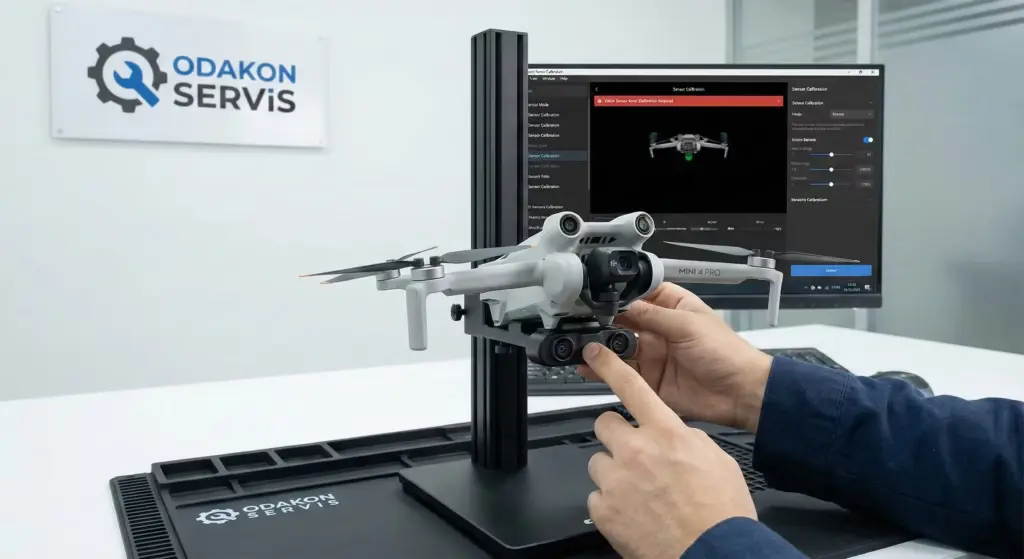
Error Code 180016 / 180030: Vision Sensor Error
- What Does It Mean? The drone cannot see its surroundings.
- Causes: Fingerprints, dust, or calibration loss on the sensor lenses.
- Mini 4 Pro Special Note: The Mini 4 Pro has “Omnidirectional” sensors. These sensors are highly affected by body flex.
- Odakon Service Recommendation: First, clean the sensors. For Mini 3 Pro, you can try calibration via DJI Assistant 2 on PC. However, for Mini 4 Pro, this calibration is performed at the service center with special equipment. If the error persists, sensor module replacement is required.
5. Battery and Power Management Errors (16xxxx)
DJI batteries are “Smart” batteries (BMS — Battery Management System). They have their own processors.
Error Code 161000: Battery Communication Error
- What Does It Mean? The battery data pins (center pins) cannot communicate with the drone.
- Solution: Clean the gold pins on both the battery slot and the battery itself with alcohol.
Battery LED Errors:
- LED 2 Flashing Rapidly: SHORT CIRCUIT! Do not use this battery under any circumstances — there is a fire risk.
- LED 3 Flashing: Overcharge. Voltage has exceeded 4.4V.
- Code 30078 (Low Voltage): One of the cells has died. Battery replacement is required.
6. Software and Update Errors (Code 180)
Error Code 180: Firmware Version Mismatch
- What Does It Mean? The drone’s firmware version doesn’t match the Controller (RC) or App version.
- Solution: Update all devices (Drone, Controller, Phone App) to the latest version.
- Important: If you get an error at 50% during update, check your internet connection and try updating using DJI Assistant 2 (PC Software).