
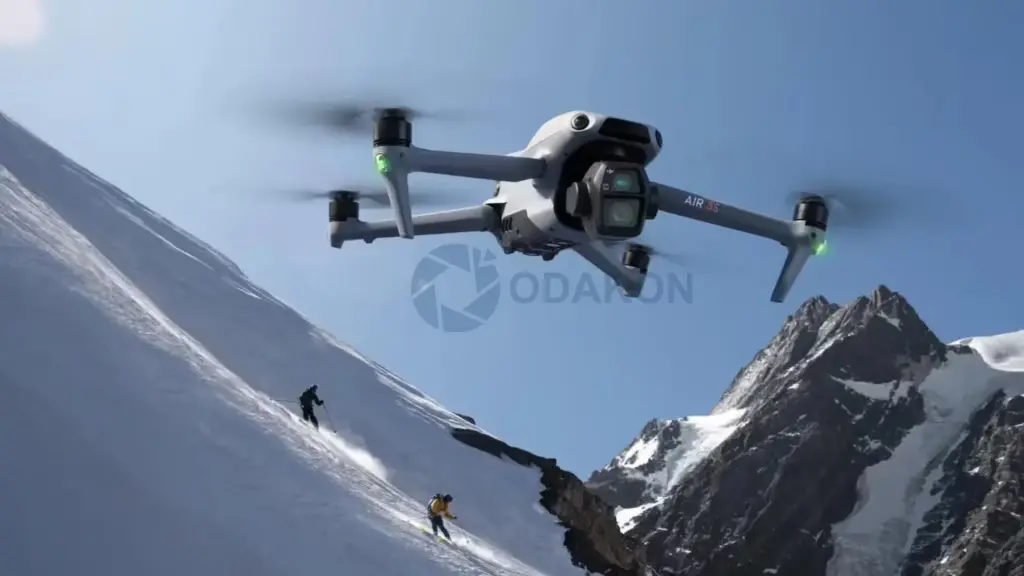
The Silent Killer of DJI Drones: Cold Weather and Li-Po Battery Chemistry
The vast majority of winter drone crashes begin with the pilot asking “I had battery left, why did it fall?” and end with a “voltage sag” diagnosis at the service center. If you want to fly safely in winter as a drone pilot, you need to understand not just the weather forecast, but the chemistry of the Lithium Polymer (Li-Po) batteries that are the heart of your drone.
In this article, we examine in full detail the molecular effects of cold weather on batteries, the concept of Internal Resistance, and the critically important Voltage Sag phenomenon.
Li-Po Battery Chemistry: Why They Hate the Cold
The Li-Po batteries we use in our drones store energy through a chemical process. Inside the battery, lithium ions (Li+) move between the Anode (−) and Cathode (+) terminals. The liquid/gel in which these ions swim is called the Electrolyte.
What Happens in the Cold?
When the air temperature begins to drop below 15°C (59°F), the electrolyte inside the battery starts to thicken. You can compare this to fluid olive oil solidifying when placed in the refrigerator.
- Ion Movement Slows: Lithium ions struggle to move through the thickened electrolyte.
- Chemical Reaction Delays: The battery struggles to produce the energy needed.
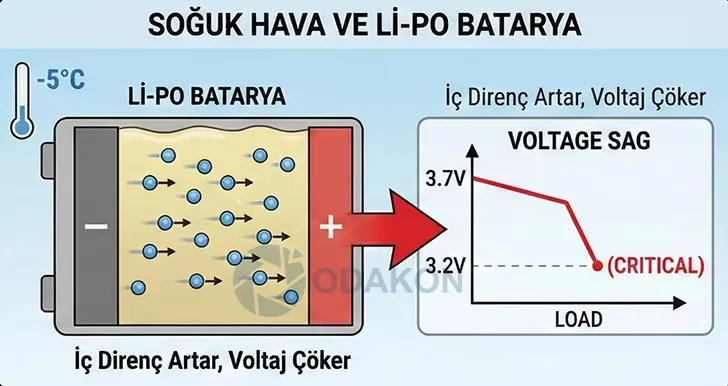
- Internal Resistance Increases: This is the most critical point. The electrical resistance within the battery itself (Internal Resistance — IR) skyrockets.
“Voltage Sag”: The Invisible Danger
This is where most pilots make their biggest mistake: Battery percentage (%) and Battery Voltage (V) are not the same thing.
In summer heat, you can fly at full throttle with 50% charge. The battery easily supplies the sudden, high current (Amps) that the motors demand. In winter, however, the situation is very different.
Scenario: Why You Crash in Winter
- Situation: The air is 5°C (41°F). Your battery is cold. Charge level is 60%.
- Action: You switched to Sport mode and began a rapid climb or are fighting against strong wind.
- Event: The motors draw very high instantaneous current from the battery to handle that load.
- Result (Sag): The battery — whose internal resistance has increased due to cold — cannot deliver this current. The voltage suddenly plummets.
DJI and other smart battery systems, the moment they see the cell voltage drop below a critical level (typically 3.2V–3.4V per cell), issue a “Critically Low Voltage” warning regardless of the battery percentage and initiate a forced landing to protect the motors. If the voltage drop is too severe, the drone can completely cut power mid-air and drop like a stone.
Critical Numbers: Cell Voltage
During winter flights, make sure to bring the voltage indicator to the main screen in DJI Fly or GO 4 app. Trust the voltage (V), not the percentage (%).
- 4.20 V: Fully charged cell (Safe).
- 3.70 V: Nominal voltage (Stable flight).
- 3.50 V: YELLOW ALERT. (If you see this value under load in cold weather, cut the throttle immediately and fly gently).
- 3.30 V: RED ALERT. (You have seconds to land — the drone can cut power at any moment).
Expert Tip: In winter, start planning your landing when cell voltage drops to 3.6V. In cold weather, the “next 10%” charge depletes much faster than normal.
Life-Saving Measures: How to Warm Your Battery
The rule for cold weather flights is simple: The drone should be cold, the battery should be warm.
A) Pre-Flight Warming (Pre-Heating)
Never transport batteries in a cold trunk.
- Body Heat: The simplest method. Carry the batteries in the inner pockets of your jacket, close to your body.
- Vehicle Heating: While driving to the flight location, keep the batteries near the car’s climate vents (not blowing excessively hot) or on a heated seat.
- Battery Warmers: For professional work, use “Battery Warmer” pouches.
- Target Temperature: Your battery should feel warm to the touch (approximately 20–25°C / 68–77°F). If the DJI app shows battery temperature below 15°C (59°F), do not take off.
B) In-Flight Warming (Hovering)
Even if your battery is warm, after takeoff, hover at eye level (1–2 meters) for 1 minute.
- Why? The battery heats itself while operating (discharging). This 1-minute waiting period allows the battery’s internal chemistry to “wake up” and reach stable operating temperature.
Battery Health and Lifespan (Cycle Count)
Winter doesn’t forgive old batteries. A Li-Po battery’s “Internal Resistance” naturally increases as its usage lifespan (Cycles) grows.
- New Battery: More resistant to cold.
- Old Battery (100+ Charges): Internal resistance is already high. Cold weather multiplies this further.
- Recommendation: Batteries with 150–200+ charge cycles should not be used in winter, or should only be used for very basic, low-altitude missions. Don’t take the risk.
Summary: Golden Rules for Winter Flying
- Keep the battery in your pocket until flight time.
- Hover for 1 minute at takeoff to warm up the motors and battery.
- Never make sudden climbs at Full Throttle (Sport Mode).
- Land before the battery drops to 30%.
- Watch the Voltage (3.5V), not the percentage.
Flying Drones on Snowy Terrain: Why Vision Positioning Sensors Go Blind
Flying a drone in nature covered with a white blanket of snow is visually stunning. But there’s that terrifying moment many pilots experience without understanding: despite no wind, the drone rapidly slides sideways on its own (Drift) or refuses to land.
The source of this problem isn’t GPS — it’s the eyes on the bottom of your drone. We examine why the Vision Positioning System (VPS) technology fails on snow-covered terrain and how to protect yourself from “Ghost Drift.”
How the Vision Positioning System (VPS) Works
On the bottom of your drone (for example, DJI Mini 3, Air 2S, or Mavic 3), there are typically two types of sensors:
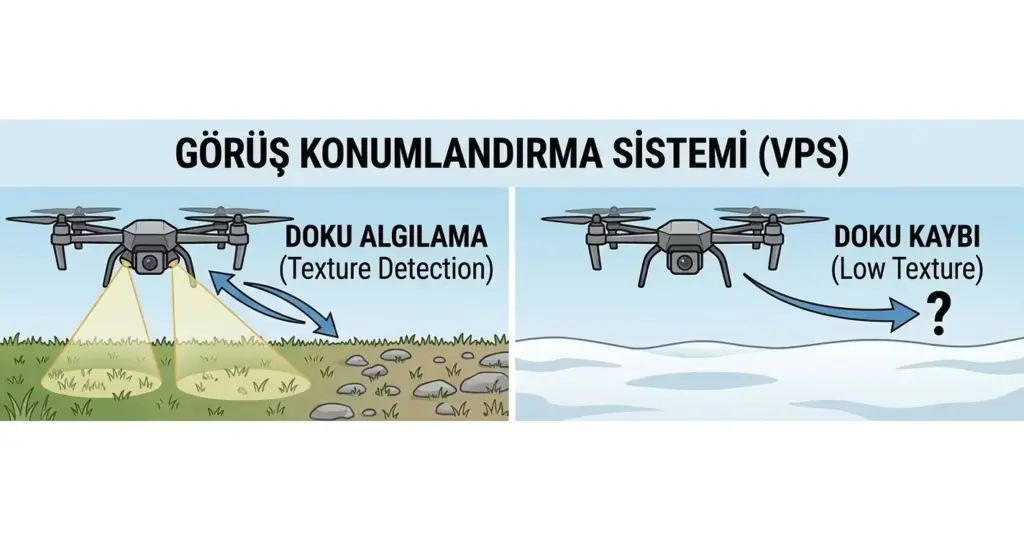
- Cameras (Optical Flow): They photograph the ground dozens of times per second and calculate whether the drone is drifting by observing the movement of ground patterns (stones, grass, pavement tiles).
- Distance Sensors (Ultrasonic / ToF — Infrared): They measure height from the ground with millimeter precision by sending sound waves or laser light.
Under normal conditions, this system keeps the drone pinned in place even in indoor areas where GPS doesn’t work.
Snow Cover: The Sensors’ Nightmare
As great as the technology is, the algorithms need “Contrast” and “Texture” to function. Here are the technical problems snow creates:
Texture Loss (Low Texture Error)
The optical flow cameras look for reference points to track on the ground. But freshly fallen snow is the flattest, smoothest, and most patternless surface in nature.
- Result: When the camera looks at the ground, it sees nothing but white void. It can’t find a pebble or blade of grass to reference. The software can no longer determine whether the drone is moving or not.
Light Reflection and Glare
On a sunny winter day, snow reflects light like a mirror. This excessive brightness disrupts the bottom cameras’ exposure balance and causes the sensors to experience temporary blindness.
The “Drift” Danger: What Is It?
This is the number one cause of winter flight crashes.
- Scenario: You’ve left your drone hovering at 3 meters.
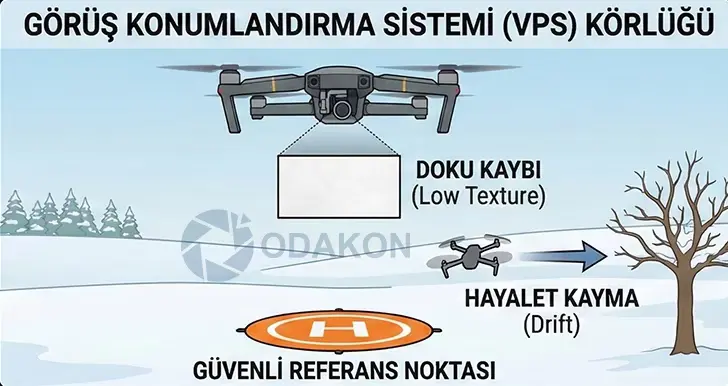
- Error: The VPS sensors either shut down or produce incorrect data because they can’t detect the ground. If your GPS signal is also weak at that moment (or you’re in a building’s shadow), the drone can’t hold its position.
- Crash Moment: A gentle breeze starts pushing the drone. Since the drone can’t reference its sensors, it doesn’t realize it’s drifting and doesn’t make a correction maneuver. As a result, the drone accelerates in the wind direction and crashes into the nearest tree or building.
Landing Problems and “Landing Protection”
There are two common problems you’ll encounter when trying to land your drone on snowy ground:
- Refusing to Land: The infrared (ToF) sensors on the drone’s bottom may misread the distance due to the snow’s surface texture. Your drone may think it’s on the ground when it’s actually 1 meter above and cut motors (or vice versa — it may think it’s still airborne after touching ground and not stop motors, causing it to tip over).
- Misleading Surface: The “Landing Protection” feature may detect the snow surface as an “unsafe/moving ground” or “water puddle” and refuse the automatic landing command. Even when the pilot pulls the stick down to land, the drone resists in mid-air.
Solution: 4 Rules for Safe Winter Flying
Here are the ways to overcome these technical limitations and fly without crashing:
Rule 1: Wait for GPS Mode (Satellite Lock)
Never risk “ATTI Mode” (no-GPS mode) in winter. Before takeoff, make sure the satellite count is at least 12–14 and the GPS icon has turned white. Even if VPS isn’t working, a strong GPS lock keeps the drone 90% stable.
You absolutely need to know the details about ATTI Mode and Flyaway situations if you’re a drone pilot! What Is ATTI Mode? Why Does Flyaway Happen?
Rule 2: Use a Landing Pad (Vitally Important!)
An orange or blue Landing Pad is a winter pilot’s best friend.
- Why? The orange pad placed on the white snow provides a perfect high-contrast reference point for the sensors. It ensures the drone doesn’t lose its position during takeoff and landing (for the “Precision Landing” feature). It also prevents snow melt from entering the motors.
Rule 3: Safe Altitude
VPS sensors are typically active between 0.5 and 10 meters. If there’s no pattern on the ground, flying in this range is risky.
- Tactic: After takeoff, quickly climb to 10–15 meters altitude. At this height, the drone relies entirely on GPS data and the barometer rather than ground sensors.
Rule 4: Manual Landing Capability
If the drone is refusing automatic landing, don’t panic. Keep holding the landing stick down (Force Landing). However, be careful that the drone doesn’t drift with the wind while doing this.
Summary: Trust Yourself, Not Your Sensors
No matter how advanced technology gets, fresh snow cover is the “Kryptonite” of autonomous systems. When flying in winter, assume that one of your drone’s “eyes” is closed and never take your fingers off the controller.
Odakon Expert Note: If your landing gear gets wet or sensor lenses fog up, always wipe them with a microfiber cloth after flight. Undried sensor lenses will cause a “Sensor Error” on your next flight.
The Silent Killer of Drones: Sudden Temperature Change (Condensation)
The most insidious thing that can happen to a pilot flying a drone in winter isn’t the drone falling into snow. Even if you don’t crash and have a great flight, you might be “breaking” your drone with your own hands when you bring it home.
Many users can’t understand why their drone suddenly gives “Gimbal Error,” “ESC Error,” or “Sensor Calibration Error” 2 weeks after a flight. “My drone never fell in water!” you might say. But the drone didn’t fall into water — water formed inside your drone.
In this section, we explain how the “Dew Point” concept in physics corrodes electronic devices and how to prevent it 100%.
Physics Lesson: What Is Condensation?
Let’s start with a simple example: What happens when you take an ice-cold bottle of soda from the refrigerator and place it on a warm kitchen counter? The outside of the bottle “sweats” within seconds and gets covered in water droplets.
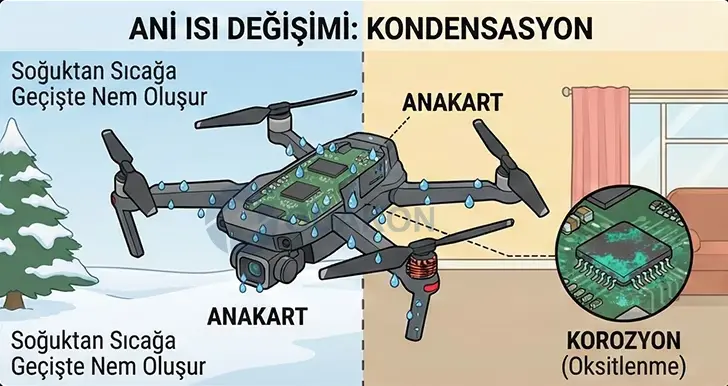
Why? Cold air can’t hold moisture; warm air can. When the warm, humid indoor air hits the ice-cold drone body coming from −5°C (23°F), it suddenly cools. The cooling air can no longer carry its moisture and deposits it as water droplets on the nearest cold surface — your drone.
What’s Happening Inside Your Drone?
You can wipe the outside of a soda bottle. But on your drone, this sweating doesn’t happen only on the outer shell. It happens everywhere the cold air has penetrated:
- Motherboard (Core Board): Microscopic water droplets fill the spaces between processor pins and microchips.
- Camera Lens: Fog forms inside the lens assembly. This stain cannot be removed by wiping from the outside — the lens needs to be disassembled.
- Motor Windings: Moisture accumulates on the copper windings.
The Insidious Threat: Corrosion (Oxidation)
This water isn’t pure — it also contains dust and particles from the air. Even if you don’t turn on the drone immediately, this moisture stays on the metal pins. Over time (3 days to 2 weeks), it reacts with oxygen to form a greenish crust (copper oxide). This crust “eats away” and breaks the tiny traces on the motherboard. Result: Motherboard failures that are very difficult and expensive to repair.
“How Should I Protect My Drone?” (Acclimatization Technique)
The solution is very simple but requires patience. The goal is to raise the drone’s temperature gradually.
Step 1: Cold Packing
When your flight is over, while still outdoors (in the cold), remove the battery and put the drone in its bag, zipping it tightly shut.
- Logic: The air trapped inside the bag is the dry, cold outdoor air. It’s not humid.
Step 2: Transition Zone
Bring the bag into the warm car or home. But DO NOT OPEN THE BAG. Let the drone sit inside the bag at room temperature for at least 2 hours.
Step 3: Slow Warming
While the warm home environment heats the outside of the bag, the drone inside gradually warms up (without experiencing thermal shock). Once the drone’s metal components reach room temperature, you can safely open the bag. Since the surface is now warm, the moisture in the air will no longer condense.
Extra Protection: Silica Gel and Desiccants
A professional winter pilot’s bag should always contain Silica Gel packets.
- These small packets absorb and trap any potential moisture inside the bag.
- Replace these packets at the start of each winter season or reactivate them by drying in the microwave.
Emergency: “I Forgot and Brought It Inside — What Should I Do?”
If you brought the drone from cold to warm without any protection and you see water droplets (sweating) on it:
- NEVER POWER ON (No Power): Don’t insert the battery. Electrical current accelerates the corrosive effect of water (electrolysis) 100-fold.
- Drying: Place the drone in a warm area with air circulation (near a radiator, but not on top of it).
- No Rice: Don’t bury the drone in rice. Rice dust jams gimbal motors.
- Service Check: If you suspect significant moisture has entered the drone, don’t take the risk.
In cases of suspected liquid contact or condensation, contact the Odakon DJI Drone Service team immediately! The damage your device has sustained will become more costly as time passes.
Odakon Technical Service Recommendation: When the winter season ends, or after an intensive snowy/humid shoot, sending your drone for “Ultrasonic Motherboard Cleaning” and a general service check at our center will extend your device’s lifespan by years. Oxidation is like cancer — if caught early, the motherboard can be saved.
Why Do Your Winter Videos Shake? “Jello Effect” and Cold-Cracked Drones
Have you been disappointed when you transferred those stunning winter snow landscape videos to your computer? Are there undulations in the footage as if a jelly bowl were wobbling (Jello Effect)? Or did your drone’s arm snap like glass during a simple hard landing you’d done dozens of times in summer?
The problem isn’t your camera or your piloting. The problem is the physical effect of cold weather on polymers (plastics and rubbers). In this section, we share how cold changes your drone’s mechanical parts and the secrets to shooting vibration-free (smooth) winter videos.
Material Science: Why Plastic “Vitrifies” in Cold
Drone bodies (DJI Mini, Air, Mavic series) are made from high-strength composite plastics to keep them light. Propellers are special polymers that need to be flexible.
Loss of Flexibility
When air temperature drops below 0°C (32°F), the molecular chains that form the plastic stiffen and lose their flexibility. In material science terminology, this is called approaching the “Glass Transition” process.
- In summer: If a propeller hits a stone, it flexes — the tip might bend but it won’t break off.
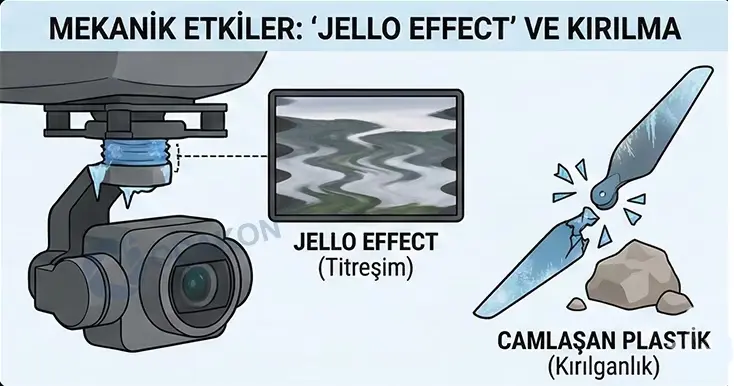
- In winter: The same propeller has lost its molecular flexibility in the cold, so instead of flexing, it instantly shatters like glass.
- Risk: Landing gear and drone arms can’t absorb impact from even the slightest hard landing and break off from the body.
Odakon Tip: Avoid using “Sport Mode” during winter flights. Sudden braking applies high G-forces to the frozen body and can cause micro-cracks even in mid-air.
The Enemy of Videos: “Jello Effect”
The Jello effect is when all or parts of the video wobble/undulate like jelly.
Why Does It Only Happen in Winter?
Your drone’s camera (Gimbal) is connected to the body with soft rubber/silicone blocks called “Dampers.” Their job is to absorb high-frequency vibrations from the motors and prevent them from reaching the camera.
But in cold weather, these rubber dampers freeze and harden.
- Hardened Damper: Loses its vibration-absorbing property.
- Vibration Transfer: The micro-vibrations created by the motors are transmitted directly to the camera.
- Rolling Shutter Artifact: Drone CMOS sensors scan the image line by line. When the camera vibrates, there’s a position difference between when the sensor scans the top line and the bottom line. This creates the bending and undulations in the footage.
Propeller Balance and Icing
The source of vibration isn’t only the motors. In cold weather, millimetric ice layers forming on propellers (Icing) or propellers deformed by cold (warp) disrupt the drone’s balance. An unbalanced propeller produces 3x more vibration than normal. Frozen dampers can never absorb this extra vibration, and your video becomes unusable.
Solution: Tips for Cinematic Winter Footage
It’s possible to shoot smooth videos despite frozen materials. Here are the professional methods:
A) ND Filter Usage (Most Effective Solution)
If you “can’t eliminate” the Jello effect, you should hide it.
- Technique: Reduce the light entering the camera using an ND (Neutral Density) filter.
- Setting: Lower your Shutter speed (For example, if shooting at 24fps, Shutter should be 1/50).
- Result: The slow shutter speed adds natural motion blur to each frame. This blur “smooths out” the micro-vibrations and makes the Jello effect invisible to the eye.
B) Warming the Dampers
Just as you warm the batteries before flight, also gently warm the drone’s gimbal area. Make sure the dampers are soft.
C) Propeller Check
As you head into winter, be sure to replace propellers that have scratches or wear with new sets. New propellers have better balance and produce less vibration.
D) Gimbal Protector (Gimbal Clamp)
Put the gimbal protector on as soon as the flight ends. In the cold, the sensitized gimbal motors and ribbon cables (flex cable) can easily break off if they swing during transport.
After a Crash: Don’t Glue It!
The most common service case in winter is attempting to glue drone arms that broke in the cold with super glue (Cyanoacrylate).
- Warning: Super glue crystallizes in cold and makes the plastic even more brittle. Additionally, the glue fumes adhere to the camera lens and sensors, creating permanent blindness.
- Correct Method: A broken arm or landing gear must be replaced with original spare parts.
Summary
Flying drones in winter requires being gentle with your equipment.
- In summer: Your drone is like a flexible willow branch.
- In winter: Your drone is like a dry stick — try to bend it and it snaps.
Odakon Technical Service Note: If your videos persistently show shaking, there may be permanent damage to your gimbal motors or dampers. You can get support from our service for vibration analysis and damper replacement.